
A Step-by-Step Song Creation Guide for Beginner Music Producers
Have you ever opened your DAW (Digital Audio Workstation) and stared at the blank slate wondering where to begin?
We’ve all been there, and any producer will tell you that this experience is completely normal.
The music production process combines creativity with a wide array of other skill sets that can feel daunting: artistry, technology, decision-making, music theory, sound design, mixing and mastering and many more are all skill sets that play a role in the production process.
Many beginner producers tend to assume that professionals work purely off inspiration alone, but the reality is that most finished songs come from clear processes to the approach, repeatable workflows, and dedication rather than random bursts of creativity.
This article is designed to give you exactly that: a step-by-step process full of ideas that will help create a framework for your personal song creation process that you can follow every time you start a new track. The goal is to help you get across the finish line as efficiently as possible.
1. Gather Inspiration
Most of the time inspiration in some form or another is the first step for a song. This inspiration can come from anywhere: a particular sample you find in your library, another song that you love, a story you heard, a concept you want to explore, etc. It doesn’t matter where the inspiration comes from, what’s important is that you approach the songwriting process with some conceptual theme.
This doesn’t have to be fully formed or dramatic, and it doesn’t mean that you’re stuck with that theme, sample, or even song style or genre. Many producers feel they need to come to the writing process with a fully-formed musical idea before they even begin writing, and for the majority of us this just isn’t the case and can in some cases lead to procrastination. The truth of the matter is that inspiration is simply a starting point, not a finished vision.
Below are a few great places to start when you’re looking for inspiration:
Listen to Music with Intention
This is a common starting place for me, simply listening to music that I genuinely love with intention. It’s important not to just put the music on in the background while your focus is elsewhere but to instead listen analytically. Pay attention to:
- The overall mood, theme, or emotional tone
- The arrangement
- The sound design and types of sounds used in the drums, synths, vocals, effects, etc.
- How the song progresses and builds/releases tension
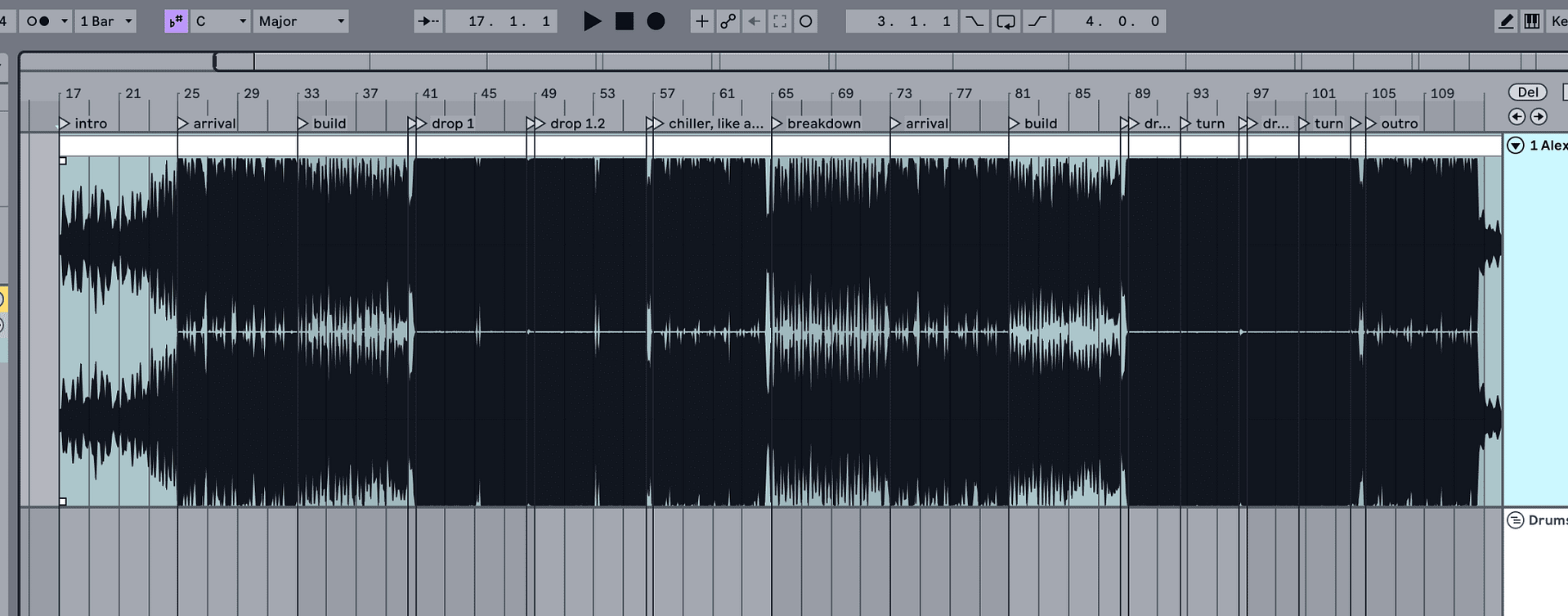
Many times I’ll select a song and actually drag the mp3 into my project for analysis and sometimes an arrangement starting point. You’re not trying to copy these songs, all you’re doing is training yourself to recognize structure and stylistic aspects that are common to the genre.
Explore Multiple Genres
Just because you produce music in a certain genre doesn’t mean you can’t take inspiration from other genres, even ones that are very different than what you typically create. Listening outside of your genre of choice can be extremely helpful in sparking creative ideas.
Bass music genres, for example, draw heavily from hip hop, pop, and world music styles at times. Consider using chord progressions from pop tunes, sound design elements from minimal techno or experimental electronic, and rhythmic ideas from jazz. All of these different elements can lend your song a unique flavor and lead you in a direction that you might not have initially gone.
Draw Inspiration Beyond Music
We don’t have to stop at music for our source of inspiration: some of the best musical ideas can come from non-musical sources such as films, books, video games, photography, art, and personal experiences.
Let’s say for example you are watching a movie that really makes you feel something, and you want to write a song that tries to convey that same feeling to the listener. Think about the overarching themes of the movie, the journey of the main character, and whether the story feels bright and happy, dark and moody, psychedelic and trippy. Sample quotes and sounds from the movie and incorporate them into your track.
Write Down Concepts
It’s been scientifically proven that writing down goals, thoughts, and ideas make those concepts more likely to stick in your head.
By writing down a few notes such as a mood or emotion, a visual image or scene, a short theme or story, etc. you’ve provided yourself with direction and focus that can help you stay on theme and helps to prevent wandering away from the initial goal in the writing process.
2. Set Up Your Workspace
I try to keep my studio as organized as possible, as I find that an organized workspace reduces mental friction and allows me to focus on the task at hand better. When you’re working in a chaotic environment, the chaos can bleed into your production session in a negative way and creativity can suffer.
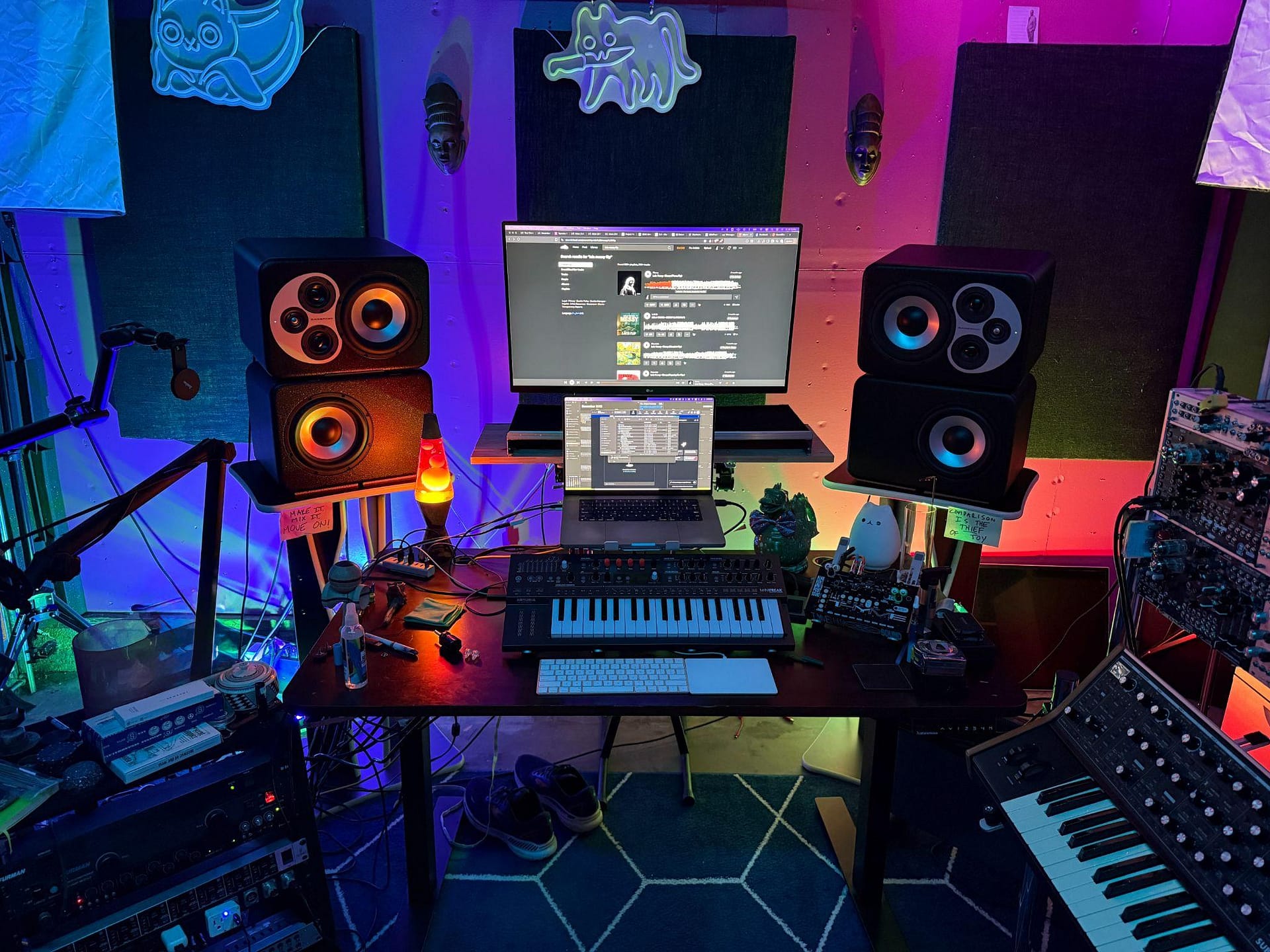
Keep your desk clear and free of clutter, surround yourself with only items that inspire and uplift. If you use synths and hardware make sure these items are plugged in and ready for use. When your tools are ready and predictable, the ideas will flow more easily.
Choose Your DAW and Commit to It
It doesn’t matter what your preferred DAW is, almost any DAW out there can produce professional-quality music. What’s important here is that you stick with one and learn it inside and out. When you’re familiar with the inner workings of your DAW and its particular workflow, this will save you time and help to keep the creative momentum going.
Organize Your Files
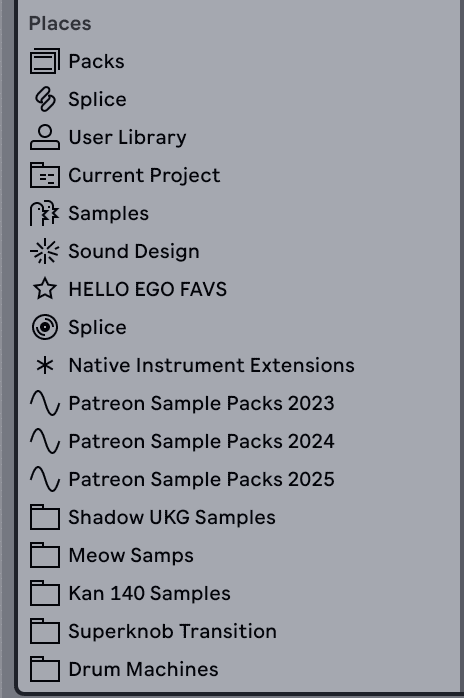
One of the biggest roadblocks to the state of flow that is so important in the writing process that I’ve seen from my students is simply disorganized files. Luckily this is also one of the easiest to fix and just takes a few hours of moving files around to create a structure that makes sense and is easily accessible.
Create for yourself a consistent file and folder structure for the following:
- Projects
- Samples
- Presets
- Exports
- Reference tracks
- Sound design
When your files are organized, you’ll know exactly where to look while in that flow state, which means more time creating and less time searching through your hard drive.
Create a Comfortable Environment
Studio vibe is important. It’s one of those things I’ve spent a lot of time curating for myself over the years. This is deeply personal and only you can decide what the correct vibe is for your studio, but basics such as a comfortable chair, minimal distractions, and proper lighting will lead to longer and more focused sessions.
3. Start with a Basic Beat
Starting with drums is a common place for many producers, and is typically where I begin. Not always, sometimes if some sample or another type of sound catches my ear I’ll roll with that, and I think it’s important that you allow yourself to break out of workflow habits from time to time like that, but barring any other source of inspiration, the beat is often an excellent starting point. Rhythm can help to anchor the song and establishes energy early on in the writing process.
Set the Tempo
Tempo is what defines the pacing of the track. It’s important that you choose a BPM range that’s appropriate for whatever genre you produce, but don’t stress over this too much. I often will adjust tempo later in the track as the song develops.
A little workflow tip here: if you find yourself working at a particular tempo more frequently, you can usually save the default project in your live set to automatically open with that tempo. I often write at 140 so my project opens at 140. Doesn’t mean I always write there, but for the genre that I produce is a common tempo and a great jumping off point.
Start with a Simple Drum Pattern
Begin with a basic beat:
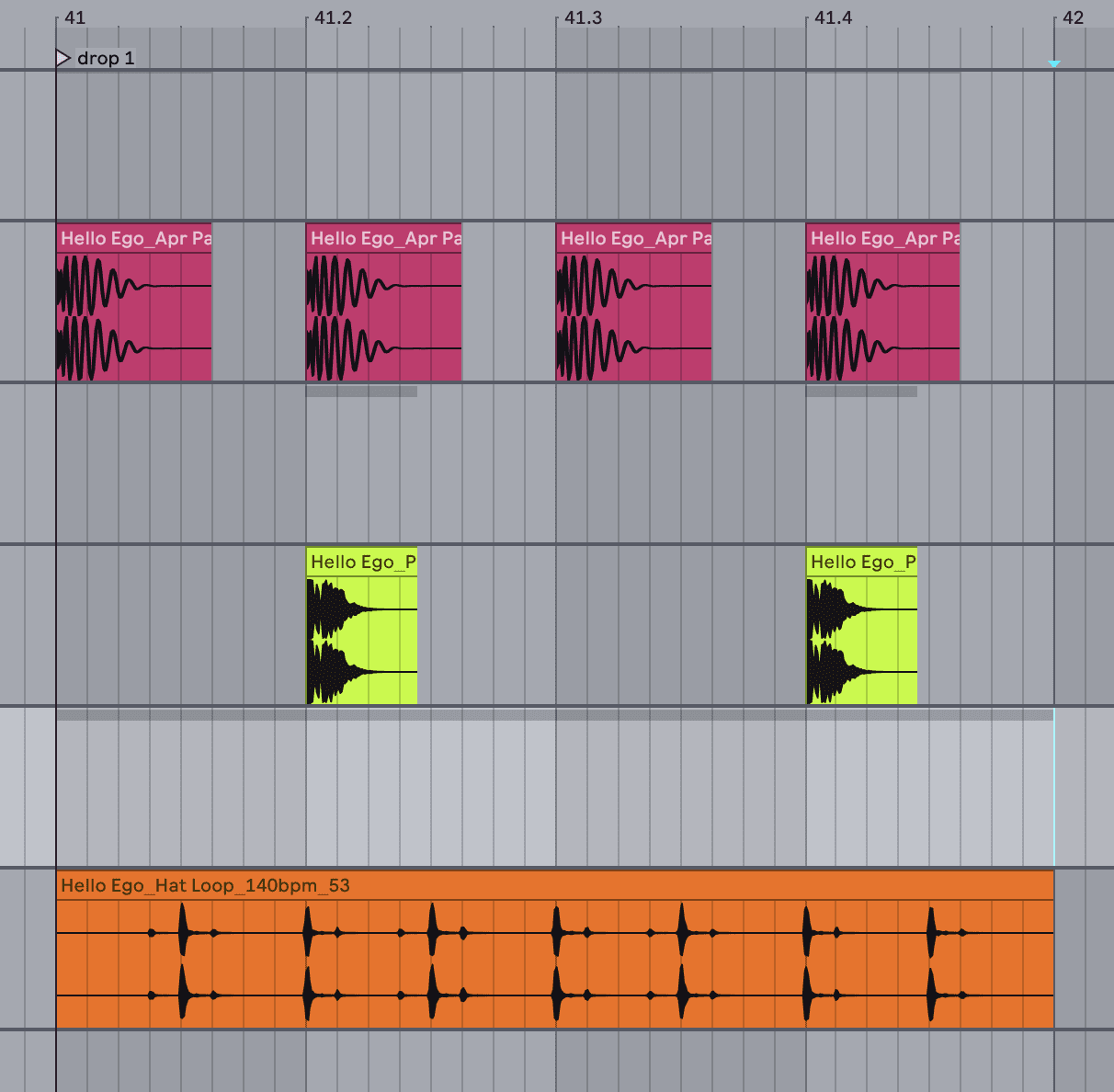
- Kick on every quarter note if you produce house and other 4-on-the-floor genres, or just on the 1 if you produce dubstep, etc.
- Snare on beats 2 and 4 if you’re working at a slower tempo, or on the 3 if you’re at a faster tempo
- Hi-hats on every beat or off-beat
No need to overthink it at the beginning. 99% of the time the beat will change as the song evolves anyway. The important thing here is forward motion and simply getting something on the page. Focus on groove rather than complexity. Many times beginner producers will tend to create overcomplicated drum patterns too early. Using a simple pattern from that start will leave room for the other musical elements and allow them to breathe. You can always jazz it up later.
Introduce Subtle Variations
Once the core beat is established, add small changes that will provide interest. Again, simplicity is key here. Little fills at the end of phrases, occasional percussive hits, and velocity/timing changes for a human feel is often all you need. These details will help to create movement and evolution without overwhelming the listener.
4. Develop the Chords and/or Melody
The harmonic and melodic aspects help create the emotional foundation of your song. Best advice I can give here is to stay simple and minimal. It’s easy to create overcomplicated melodies and chord progressions, but typically the simpler something is the more relatable the listener will find it.
Choose a Key
The key is the musical scale that your song will be in, such as C major, A minor, etc. Both of these keys are great starting points for beginners because they utilize only the white keys on the keyboard.
Build a Chord Progression
Start with a basic four-chord progression. Many popular songs rely on the same progressions because they work emotionally.
For example, in C major:
- C – G – Am – F
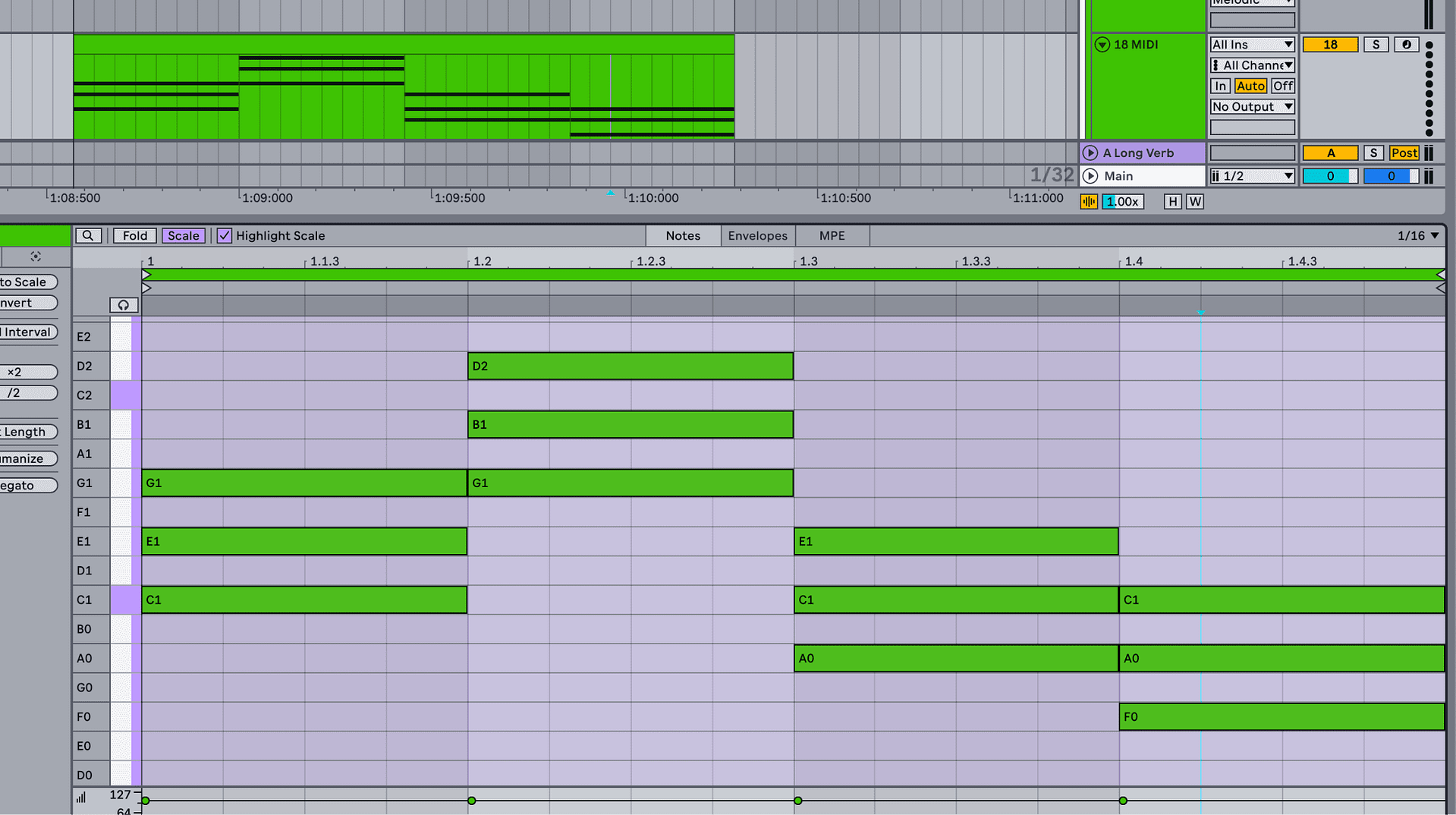
Experiment with chord lengths, note lengths, and inversions (rearranging the order of the notes, instead of a C major triad spelled with C on the bottom, then E, then G, you’d make either E or G the bottom note) to create interest.
Create a Melody
Your melody should feel connected and complimentary to the chords but still stand out and function as the focal point for the listener. Start with short phrases and repeat them with slight variations. Simplicity is often more memorable than complexity, but usually more of a challenge to create as a producer.
Trust Your Ear
You do not need advanced theory to write good melodies. If it sounds good to you, it likely works. Refinement comes later with experience.
5. Add a Bassline
In some ways, the bassline bridges the gap between the rhythm and harmony of the track while also providing low end weight and warmth.
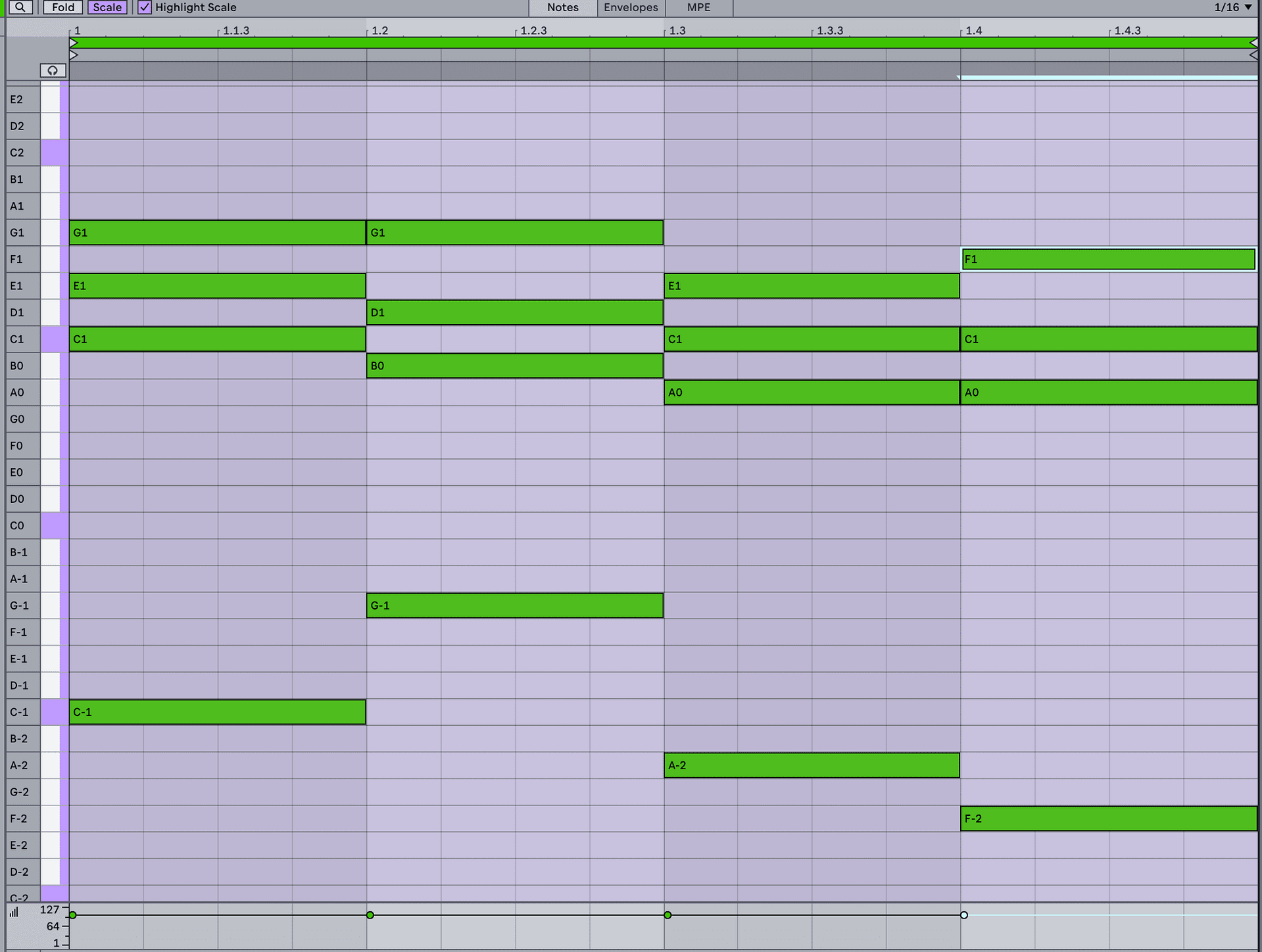
Start with Root Notes
Begin by playing the root note of each chord in a lower octave. This immediately reinforces the harmony. The root of a chord is whatever the name of that chord is, not necessarily the lowest note in the chord. For example, an A minor chord’s root is still A even if it’s spelled with E on the bottom, then C, then A (this is a second inversion spelling of the A minor chord).
Putting the bass note on the root of the chord help to re-emphasize and support that harmony.
Explore Rhythm
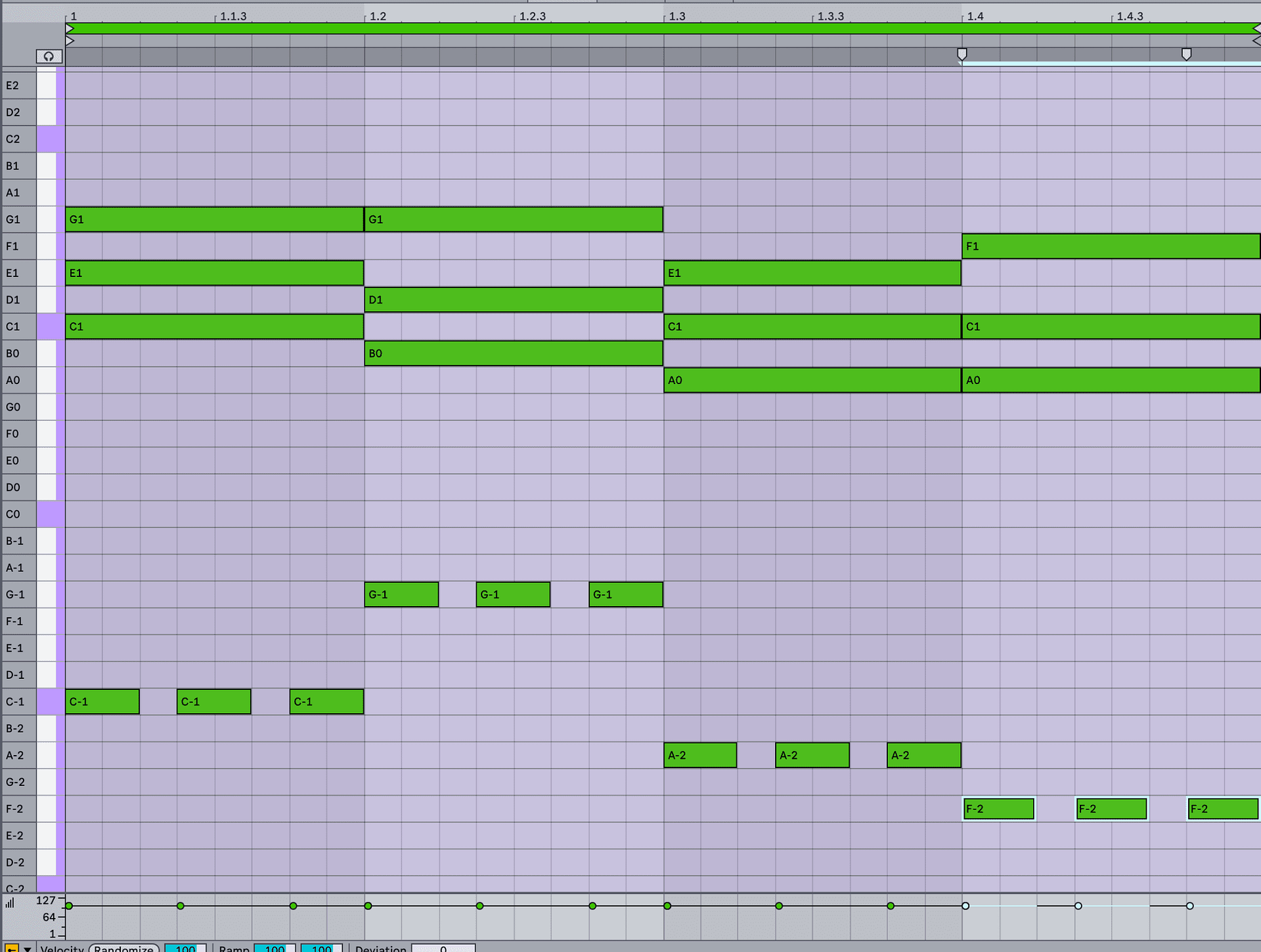
Basslines become interesting once you start adding rhythms. A few way to approach this are:
- Syncopation (starting notes on something other than the quarter note of a measure, for example, letting the first bass note last for 1.5 quarter notes AKA three 8th notes, and having the second one start where the first one releases, which would be the fourth 8th note of the measure.)
- Breaking up sustained notes into repeated quarter notes occasionally or constantly.
Locking the bass rhythm with the kick drum (common when producing hip hop, bass music, or any other genres that utilizes an 808-style bass.)
6. Expand with Additional Elements
Once the core foundation is solid, additional elements such as FX, sweeps, atmospheres, ear candy, additional percussion, etc. add color, depth, and interest.
Pads and Atmospheres
Pads fill the background and enhance emotional impact. Use slow attack times and subtle modulation to create movement. Mix these quieter than the other elements generally, it’s easy to accidentally make these too loud and they get distracting and fill up too much of the mix.
Ear Candy
This is a common terms for little background sounds and bits of sound design that add interest to a track. Delayed lasers, short vocal chops, distant percussion sounds…the options here are endless. I find for many beginner producers this a commonly-overlooked part of the process that is crucial in making a song unique and interesting.
Sound Effects and Transitions
Risers, sweeps, and impacts guide the listener through the arrangement and direct the energy flow of various sections of your track. These elements help signal changes and build anticipation.
7. Structure Your Song
Arrangement turns loops into complete compositions.
So often producers will get stuck in loop mode, but a song is not a song without an arrangement of some sort. Arrangements turn loops into complete compositions, so I usually recommend getting to the point where you’ve created a basic arrangement as soon as you have a compelling 16-32 bar loop, if not earlier.
Sometimes I’ll utilize other tracks as the inspiration for my arrangement by dragging them into my project and mapping out a basic starting arrangement structure based on theirs. This help me to visual the song as a whole much earlier, and keeps reminding me that even though this loop is cool, I still need an intro, verse, chorus, drop, build, etc.
Learn Common Song Structures
Common structures include:
- Intro – Verse – Chorus – Verse – Chorus – Outro
Verse – Build – Drop – Break – Drop

Arrange Sections Horizontally
Lay out sections across your DAW timeline. Copy existing elements and modify them slightly to maintain cohesion. I like to start with what I call a “superloop” of ideas, which is basically just a loop with a lot of cool ideas, then copy it across and create my initial arrangement by simply turning on or off various elements at times to create contrast between the sections.
Implement Transitions Thoughtfully and Early
Drum fills, automation, and effects help smooth transitions and maintain momentum. Too often producers leave this until later in the writing session, but I’ve found that if you can put some time into these very early, you’ll find that the track feels as though it’s coming together and taking form more rapidly, which is often the burst of inspiration I personally need to continue working on the track.
8. Add Vocals (Optional, But Highly Recommended)
Vocals are powerful but not required for a track of course. But it’s important to understand the biological disposition that we as humans have to gravitate towards and relate to music that utilized vocals in some way. It’s not that we can’t feel a connection to a song without vocals, but I’ve noticed that it’s easier for listeners to get into the music with a vocal element, even a basic chop or momentary vocal fill.
9. Mix Your Track
A full overview of the mixdown process is beyond the scope of this article, but generally the process for mixing is as follows:
Balance Levels First
Volume balance is the foundation of a good mix. Adjust levels before applying heavy processing. Usually producers like to reach for a plugin or other fancy tool without realizing that the issue is a much simpler issue that can be solved by simply increasing or decreasing the gain of a sample, synth, or track.
Use EQ Strategically
EQ allows you to remove unnecessary frequencies such as low sub-level rumble, and enhance important ones.
Apply Compression Carefully
Compression controls dynamics and adds cohesion. Use it subtly to avoid over-processing.
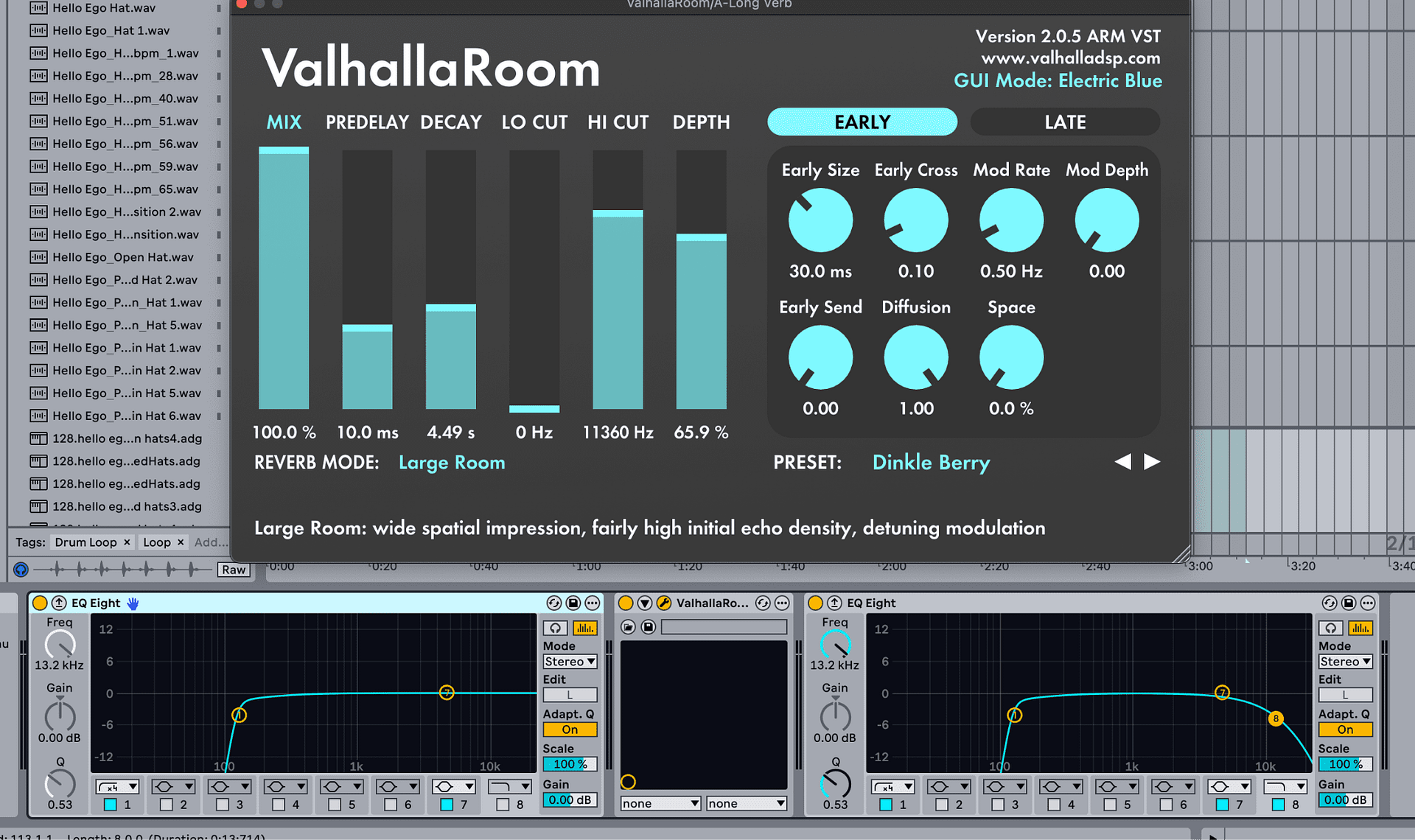
Add Space with Reverb and Delay
Reverb and delay create depth. Use sends and moderate settings to avoid muddy mixes. Be careful not to overuse reverb however. Reverb can make a bad sound sound good and it’s easy to over do it.
10. Master Your Track
Mastering prepares your song for playback across systems. Again, this is beyond the scope of this article, but generally the process is as follows:
Final EQ and Compression
Apply gentle processing to balance the overall sound. Large-scale changes here are recommended, such as increasing or decreasing the overall brightness of the track. If you find that you have to do a lot of little cuts and boosts it’s probably a mix or sound design issue and should be addressed at those stages.
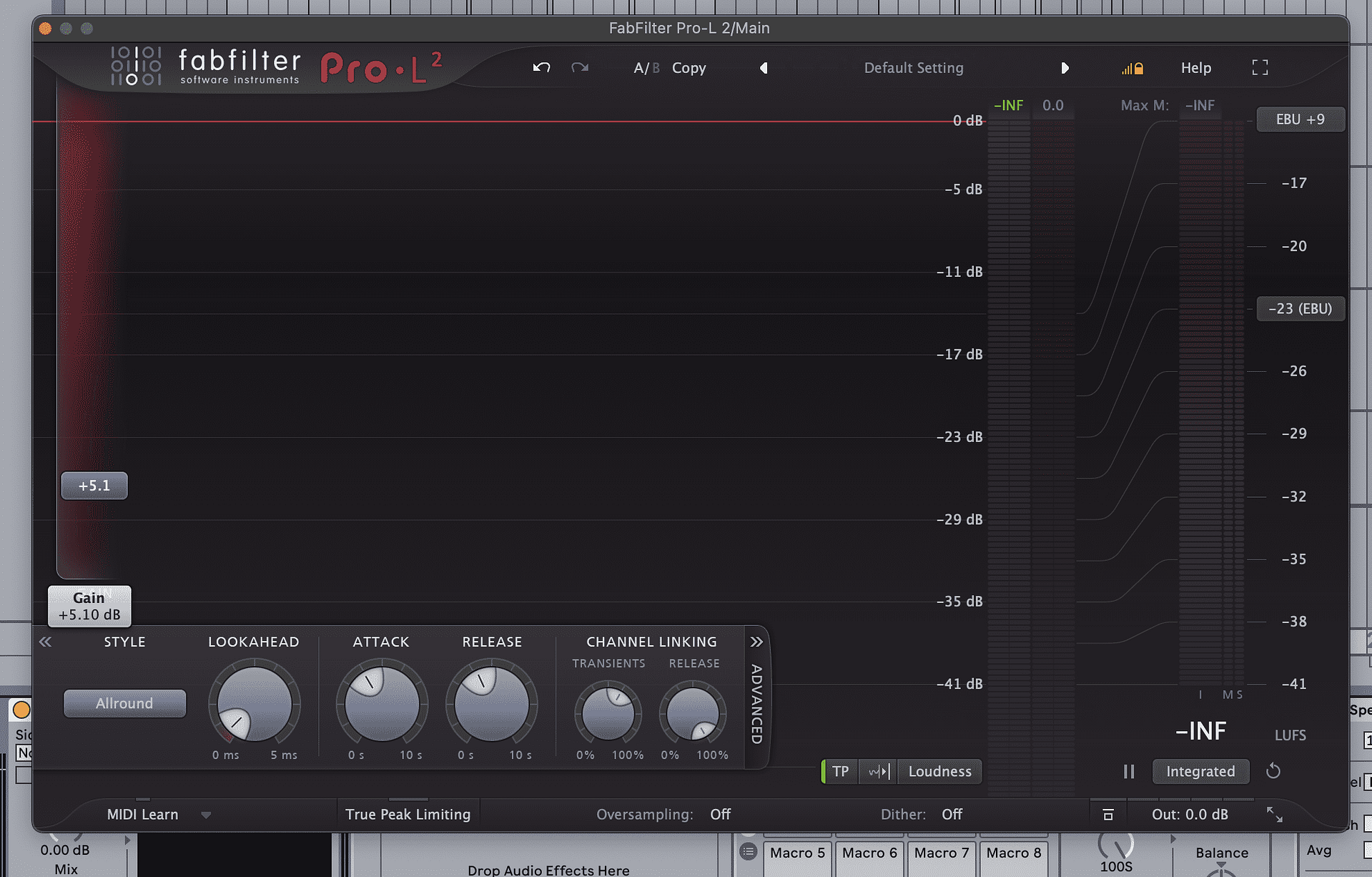
Limiting for Loudness
Use a limiter to increase perceived volume of the track.
Reference Professional Tracks
An absolutely crucial step in both the mixing and mastering process: Compare your track to commercial releases in a similar genre to evaluate tonal balance and loudness.
11. Export and Share
Finishing the track is an accomplishment that should not be taken lightly, and regardless how you feel about the quality of your music, you should share what you’ve done.
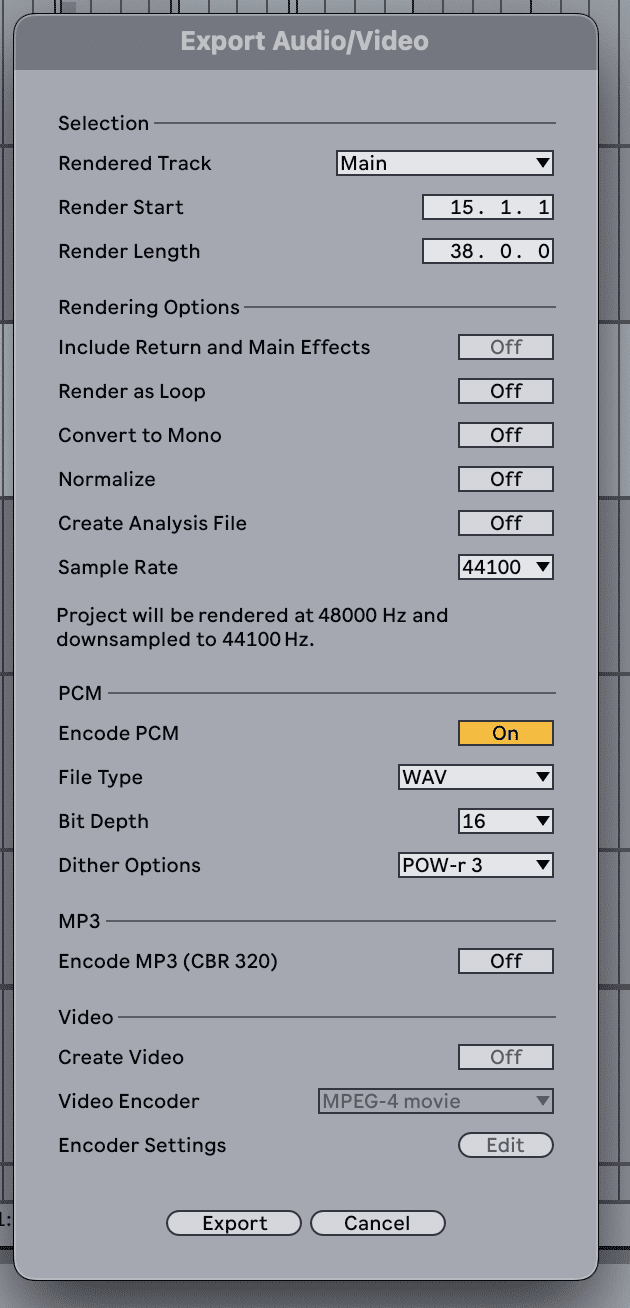
Export Settings
A standard high-quality export format:
- WAV
- 16-bit
44.1 kHz
Share Your Music
Upload to platforms like SoundCloud, YouTube, Spotify, etc. Consider digital distribution services to reach streaming platforms. I use Releese to distribute my tracks and highly recommend it.
Conclusion
It’s easy to think that you need all this experience and these expensive tools to complete a track, but that’s simply not the case. Finishing a song is about defining and following a process, making important decisions based on your own personal experience, whatever level you might be at, and most importantly, finishing what you start.
Every time you complete a track you’ve learned something new that you can apply to the next one. Production is not a quality over quantity game, but rather a quantity leads to quality one. The more songs you finish, the better you’ll get!